
Resource scheduling
ChronoLaneJS can subdivide every visible time-grid day into typed resources. A resource can represent a room, person, machine, vehicle, or any other value with a stable string or numeric ID.
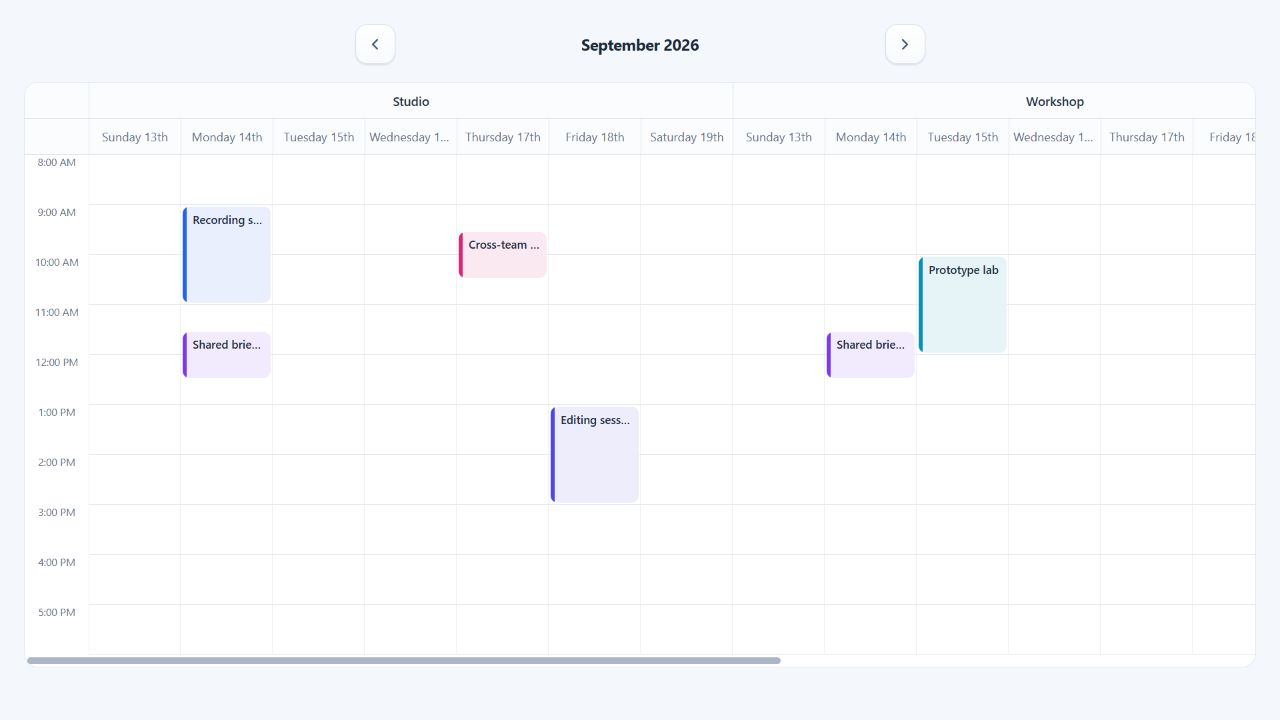
Complete resource calendar
Define the resource shape and event assignment together so TypeScript carries both through columns, callbacks, and renderers.
import { useState } from "react";
import Calendar from "@chronolanejs/react";
import type {
    CalendarEvent,
    CalendarResourceConfig,
    TimeGridEventDrop
} from "@chronolanejs/react";
import "@chronolanejs/react/styles.css";

interface Room {
    id: string;
    name: string;
    floor: number;
}

interface Meeting extends CalendarEvent {
    id: string;
    roomIds: string[];
}

const rooms: Room[] = [
    { id: "studio", name: "Studio", floor: 1 },
    { id: "workshop", name: "Workshop", floor: 2 }
];

const resources: CalendarResourceConfig<Meeting, Room> = {
    items: rooms,
    getId: (room) => room.id,
    getTitle: (room) => `${room.name} - floor ${room.floor}`,
    getEventIds: (event) => event.roomIds
};

const initialEvents: Meeting[] = [{
    id: "review",
    title: "Design review",
    start: "2026-09-14T10:00:00",
    end: "2026-09-14T11:00:00",
    roomIds: ["studio"]
}];

export default function RoomSchedule() {
    const [events, setEvents] = useState(initialEvents);

    const moveMeeting = ({
        event,
        start,
        end,
        destination
    }: TimeGridEventDrop<Meeting, Room>) => {
        setEvents((current) => current.map((item) => item.id === event.id
            ? {
                ...item,
                start,
                end,
                roomIds: destination.resource ? [destination.resource.id] : []
            }
            : item));
    };

    return (
        <Calendar<Meeting, Room>
            date="2026-09-14"
            events={events}
            view="week"
            viewProps={{
                resources,
                groupBy: "resource",
                minTime: "08:00",
                maxTime: "18:00",
                slotSizing: { minWidth: 96 },
                onEventDrop: moveMeeting
            }}
        />
    );
}
Assignment conventions
Without accessors, ChronoLaneJS reads resource.id, chooses a title from
resource.title, resource.name, or resource.id, and reads event assignments
from resourceIds, resourceId, or resource.id. Use accessors for another
domain shape.
An event assigned to multiple IDs is rendered once in each matching column. Unassigned events do not appear when resource columns are active. Resource IDs are non-empty strings or finite numbers. Invalid IDs and duplicate resource definitions throw explicit errors; a valid assignment with no matching column is ignored.
Grouping and sizing
groupBy="day" renders each day as the outer heading with its resources below.
groupBy="resource" renders each resource as the outer heading with its days
below. The underlying day-resource columns and assignments are identical.
Use slotSizing.width for fixed columns or slotSizing.minWidth for fluid
columns that scroll after reaching a minimum. Headers and slots share the same
track definition, so grouped headings stay aligned during horizontal scroll.
Resource-aware extensions
The concrete resource and stable ID are available on:
TimeGridColumn,TimeGridSlot, andTimeGridEventSegment;- movement
sourceanddestinationpositions; - event occurrence context for selection, opening, and raw interactions;
- custom resource-header, event, slot, and background-event renderers.
See Drag and resize events for controlled movement between resources and Custom renderers for typed resource headers.